
YouTube channel banner size
Upload your YouTube channel banner at 2560 × 1440 pixels. The minimum is 2048 × 1152 at 16:9, and the file has to be 6 MB or smaller. Keep text and logos in the centered safe area, because phones only show that part.
Checked against YouTube’s banner image guidelines on October 8, 2026.
YouTube channel banner dimensions
Recommended size
2560 × 1440px
Especially for TV
Minimum size
2048 × 1152px
The smallest upload YouTube asks for
Aspect ratio
16:9
Same shape as a video
Maximum file size
6MB
Or smaller
YouTube channel banner template
One banner image is cropped differently on each device. A TV shows the whole image. Computers, tablets, and phones show a strip from the middle, and the phone strip is the narrowest.
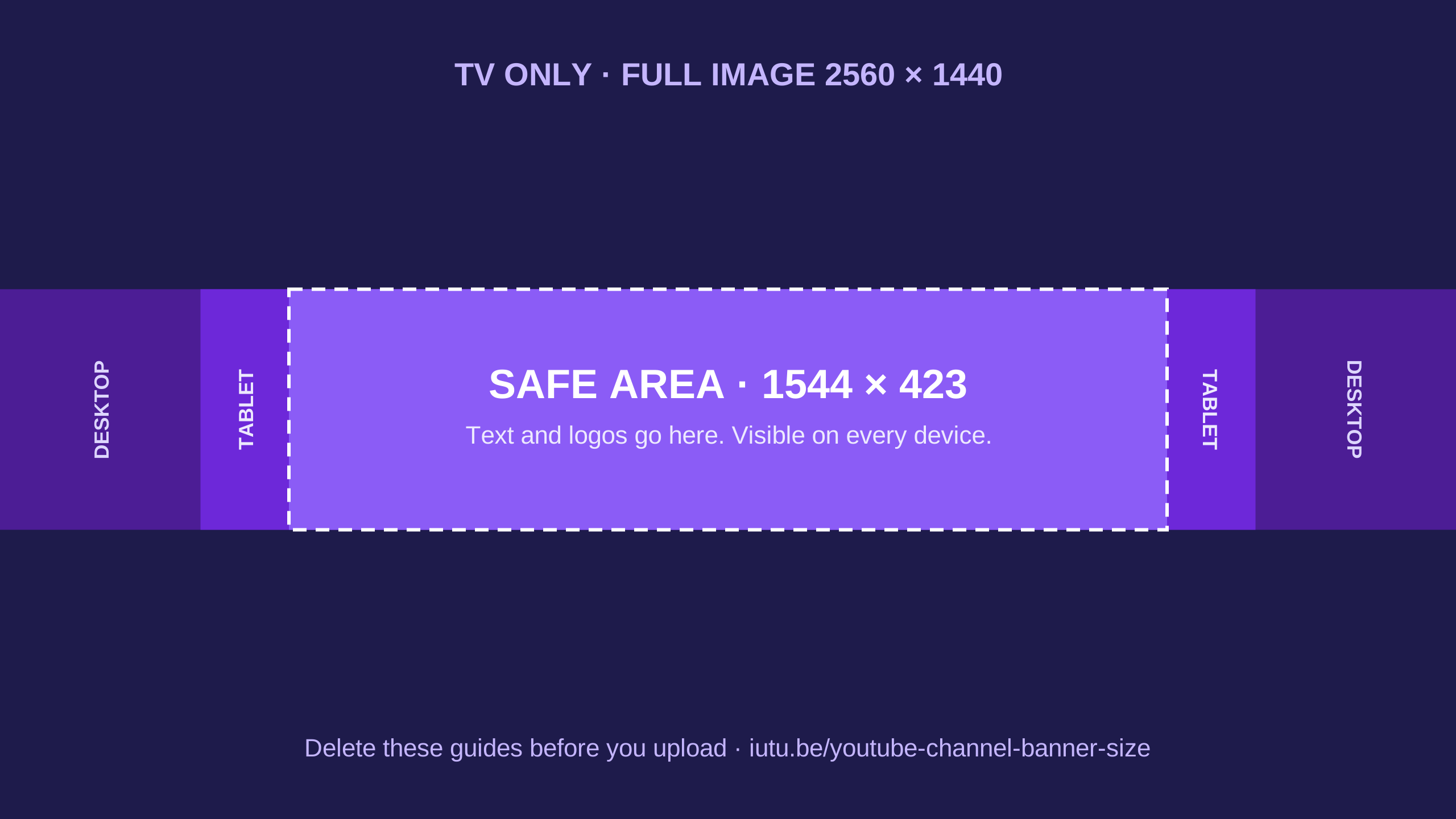
The safe area comes from YouTube’s guidelines. The tablet and desktop strips are approximate and change with the size of the browser window, so treat them as a guide.
YouTube’s banner image guidelines
- ●Minimum dimension for upload: 2048 × 1152 px, with an aspect ratio of 16:9.
- ●Safe area for text and logos at the minimum dimension: 1235 × 338 px.
- ●Recommended dimension, especially for TV: 2560 × 1440 px.
- ●The image fills the screen on larger devices and is cropped on certain views and devices.
- ●Do not add embellishments such as shadows, borders, or frames.
- ●File size: 6 MB or smaller.
YouTube banner safe area
The safe area is the centered part of the banner that is visible on every device. Anything outside it can be cropped.
| Upload size | Safe area | Where the number comes from |
|---|---|---|
| 2048 × 1152 px | 1235 × 338 px | Stated by YouTube |
| 2560 × 1440 px | 1544 × 423 px | The same area, scaled up |
You will also see 1546 × 423 quoted for the larger size. It is the same area. The two-pixel difference is rounding.
How to make a YouTube channel banner
- 1
Start with a 2560 × 1440 canvas
Use the template above, or set that size in Canva, Photoshop, Figma, or any image editor.
- 2
Put the channel name and logo in the safe area
Keep everything a viewer has to read inside the center 1544 × 423 pixels.
- 3
Fill the rest with background
The area above and below the strip shows on TV. Use color, texture, or a photo there, not words.
- 4
Export as JPG or PNG under 6 MB
Do not add a border, frame, or drop shadow around the image.
- 5
Upload it in YouTube Studio
Open the channel customization page, choose the banner image, upload the file, adjust the crop, and publish.
- 6
Check it on a phone
Open your channel in the YouTube app. If the name is cut off, move it closer to the center.
Common practices for channel banners
These are design habits, not YouTube rules.
- ●Say what the channel is about in a few words. A visitor should understand it in three seconds.
- ●Add the upload schedule if you keep one, such as “New videos every Tuesday”.
- ●Use large type. On a phone the whole banner is about as tall as a thumb.
- ●Match the colors and typeface of your thumbnails, so the channel page looks like one brand.
Still choosing a name for the banner? Try the YouTube channel name generator. For video images, see YouTube thumbnail size.
Frequently asked questions
What is the YouTube channel banner size?
YouTube recommends 2560 × 1440 pixels. The minimum upload is 2048 × 1152 pixels at a 16:9 aspect ratio, and the file must be 6 MB or smaller.
What size is a YouTube banner on a phone?
A phone shows only the center strip of the 2560 × 1440 file, about 1544 × 423 pixels. Put the channel name in that strip.
What is the safe area on a YouTube banner?
It is the centered part of the banner that every device shows. YouTube gives it as 1235 × 338 pixels on a 2048 × 1152 upload. On a 2560 × 1440 upload the same area is about 1544 × 423 pixels.
Why is my YouTube banner cut off on mobile?
One image is used on every device and cropped to fit. A TV shows all of it, and a phone shows only the center strip. Move the channel name and logo into the safe area.
What aspect ratio is a YouTube banner?
16:9 for the file you upload. What viewers see on a computer or phone is a much wider strip cut from the middle of it.
What is the maximum file size for a YouTube banner?
6 MB. If the file is larger, export it as a JPG or lower the quality until it fits.
Is there a YouTube channel banner template?
Yes. Download the 2560 × 1440 template on this page as a PNG or SVG. It marks the safe area and the wider strips. Design on top of it and remove the guides before you upload.
Is the channel banner the same as a thumbnail?
No. The banner sits at the top of your channel page. A thumbnail is the 1280 × 720 image for a single video.